Stop Being the Integration Layer Between Eight Tabs
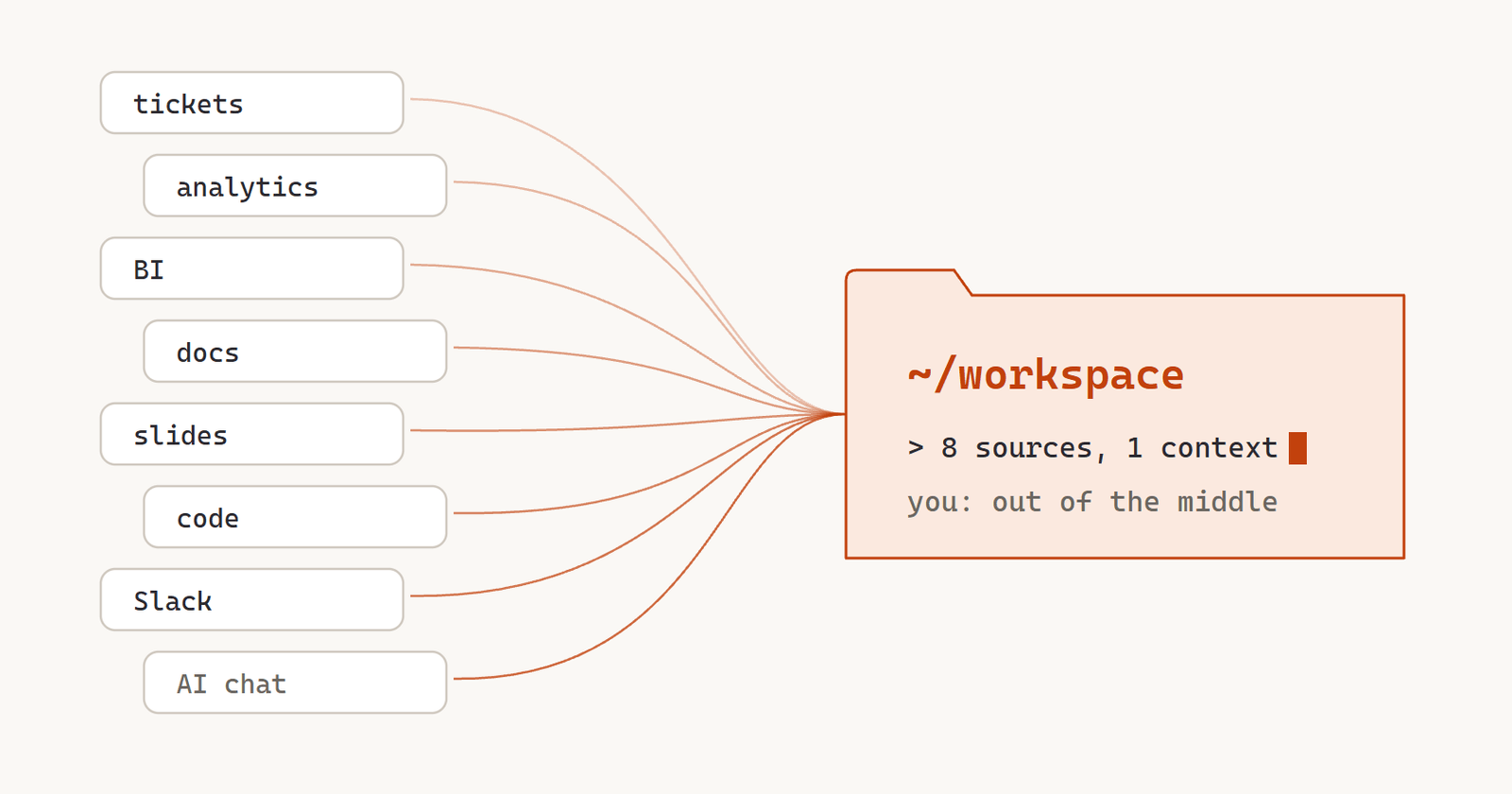
I used to have eight tabs open at all times. The ticket tool, the analytics tool, the BI tool, the docs, the slides, the codebase (which I could browse but never really read), Slack, and a chat window with an AI that had no idea what was in the other seven.
Every real task meant copy-pasting context between them. Grab a number from the BI tool, paste it into the doc, screenshot the chart for the slide, paste half the PRD into the AI so it could help me rewrite the other half. I was the glue. And the AI? The thing that’s supposed to be the big multiplier was the one in the room that knew the least.
That’s a pretty dumb way to use the most powerful tool PMs have ever had. So I flipped it around. My workspace is now a folder on my laptop, and an AI agent works inside it with access to everything at once. From there I write the PRDs, run the analyses, spot-check the roadmap, build the dashboards and make the presentations for my whole squad.
It sounds way more exotic than it is.
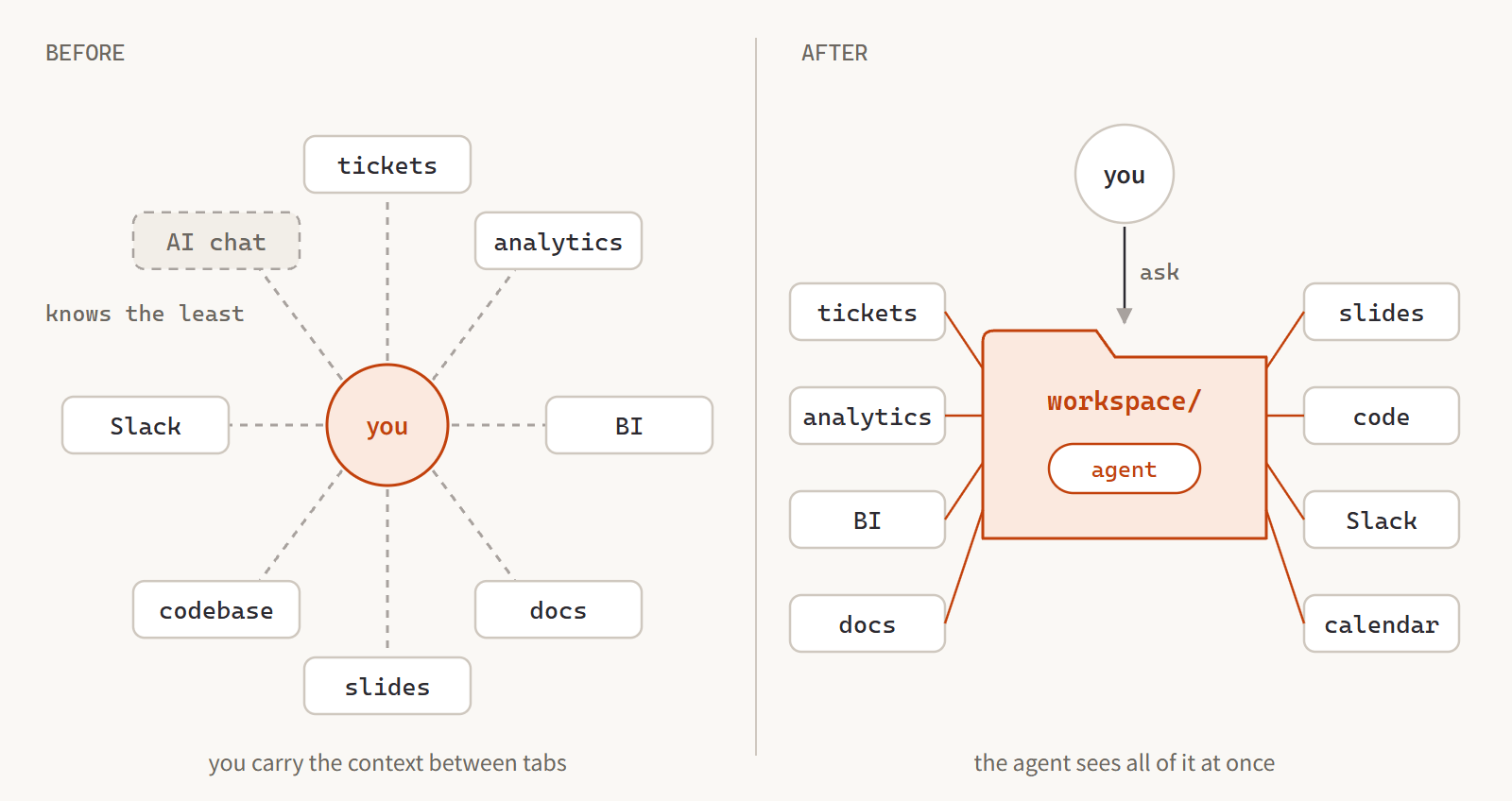 Same tabs. I’m just not standing in the middle anymore.
What’s in the Folder
It’s one repo, with the repos that matter checked out right next to it:
- The product codebase. I never edit it from here (that’s a written rule), but I read it all the time: feature flags, experiments, pricing logic, schema. When a Linear update says an experiment “randomizes per user”, the code doing the randomizing is one search away.
- The data repo. Not a database, a knowledge base about our data. How revenue is defined, what every table means, and the most valuable file in the whole setup: a running log of every time our data has fooled us. Metric definitions that were quietly wrong. Cohort cuts that double-counted. Tables that undercount because free events don’t write any rows. Give an AI warehouse access and it’ll write plausible, wrong queries. Give it that log too, and it writes queries like an analyst with a year of scar tissue.
- The creative repo. Voices, prompts and the content pipeline, so when I write copy for a content partner, their voice guide is right there.
- The workspace’s own stuff. PRD conventions, our Linear style guide, presentations and reference material.
On top of that sit skills and connections. Skills are written-down procedures the agent runs when I ask: create a Linear project set up exactly to our conventions, expand it into a PRD from our template, spot-check every active project against our checklist, build a monitoring dashboard. Each one is a decision I made once, so I never have to make it again. Connections let the agent talk to live systems directly. Linear, Metabase (our production replica and the BigQuery warehouse), Mixpanel, Slack, calendar, meeting transcripts. The same session that reads a file can query production and update a ticket.
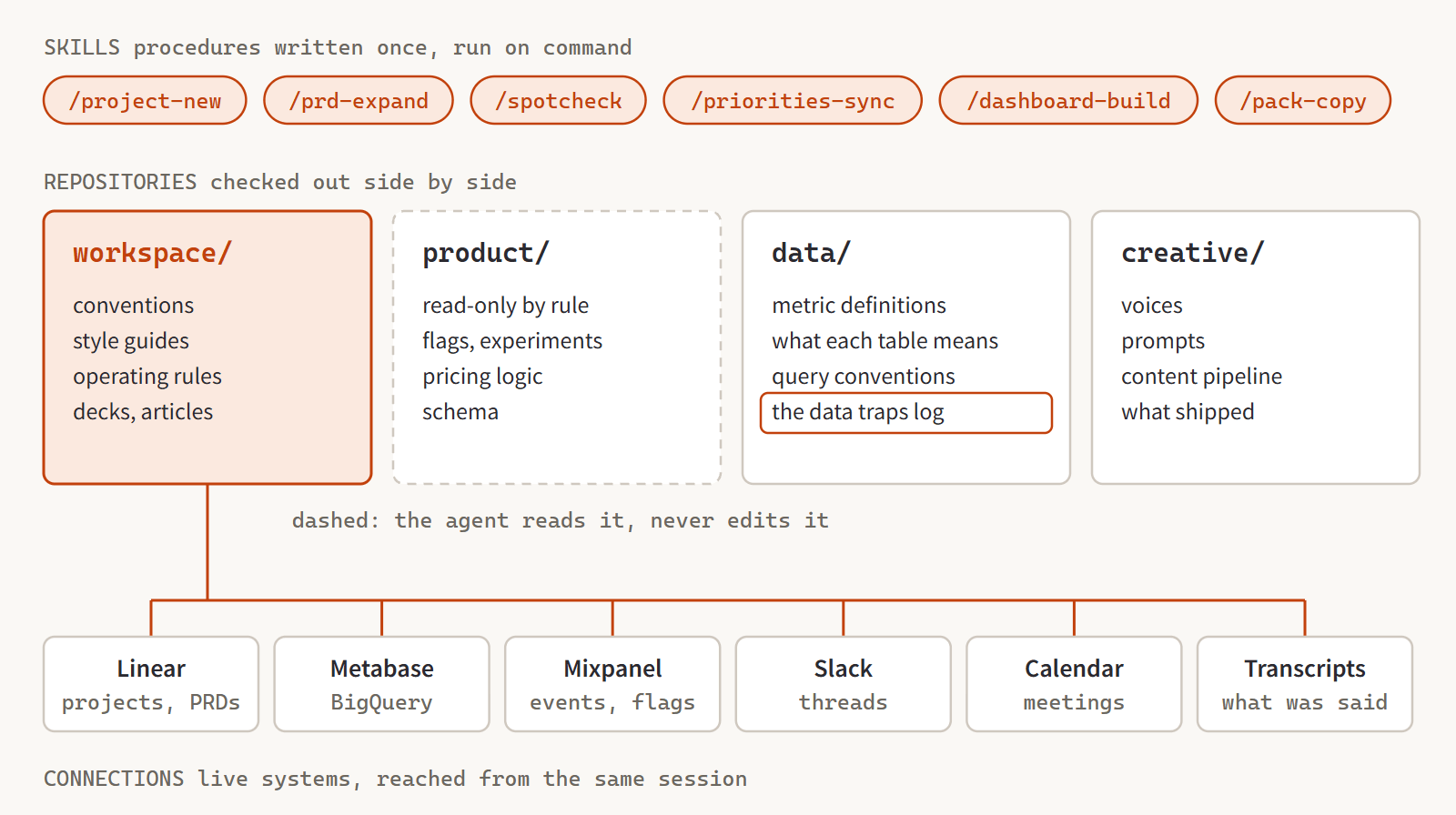 Everything the agent can see. The product code is read-only, by rule.
Why It Works
No single connection is the magic. The magic is that they all share one context window.
Last week I wanted an article and a keynote about our partner content business. In one session, the agent read the creative repo for what was actually filmed and shipped, read the product code to figure out how our live pricing experiment tags each offer, queried production for every partner’s revenue up to that morning, compared the funnels, and wrote the thing with a data appendix for the slides. Every number traced back to a query run that day. No stale screenshots from someone’s old deck.
The less flattering example is the more important one. A project update claimed a payments recovery feature was on track to plug a leak worth millions. The adoption numbers were real. But since the workspace could go from the claim in Linear straight to the raw transactions table, it found what the update didn’t say: our instrumentation can’t yet tell the new feature’s recovered dollars apart from the retry logic we already had. The part we could actually credit to the new feature? A rounding error.
Ouch.
But we caught it before it made it onto a slide. Fact-checking stopped being its own workflow. It just happens along the way now.
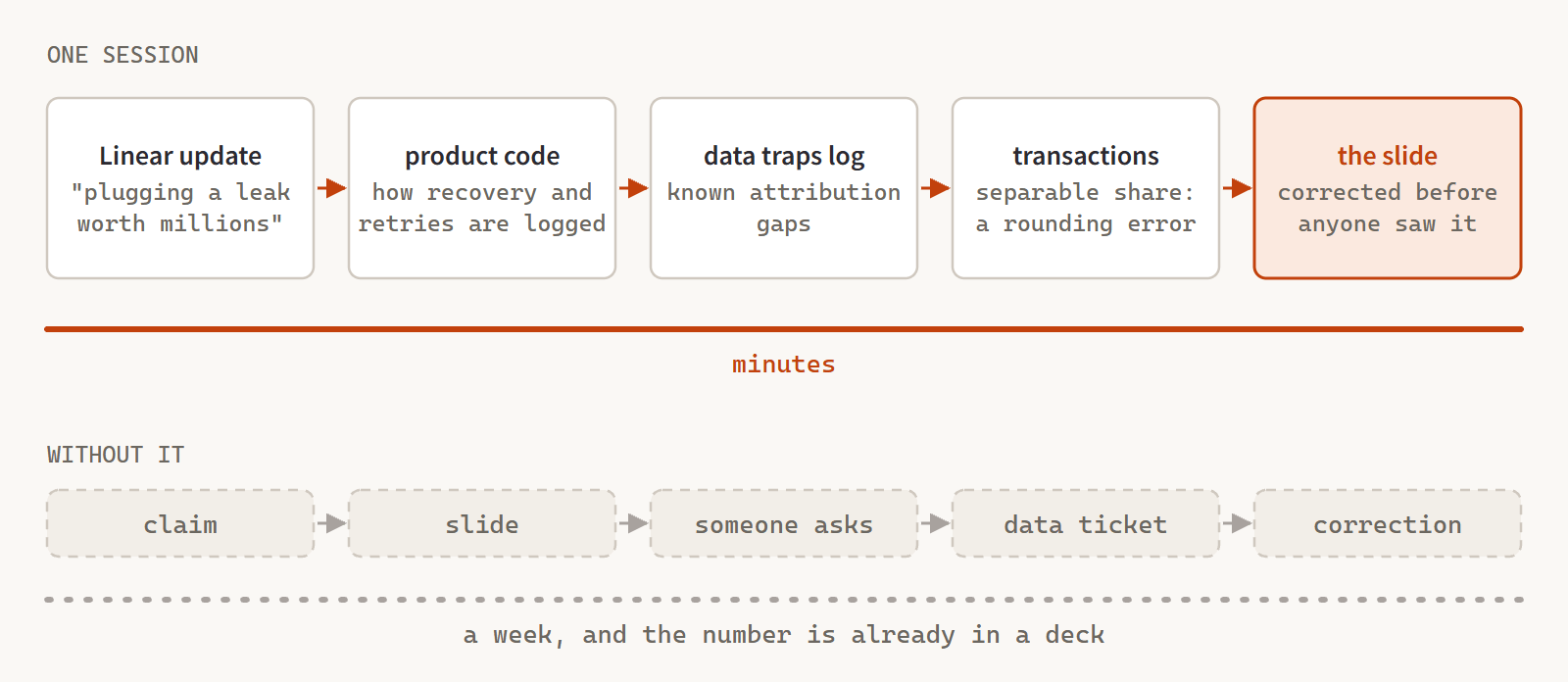 Checking a claim costs minutes, not a data ticket and a week.
Put together, the whole loop for a product squad runs from this one folder: idea to Linear project, a live data pull for the why, the PRD, reading the code while the squad builds, a dashboard at launch, and the learnings written up with every figure re-queryable.
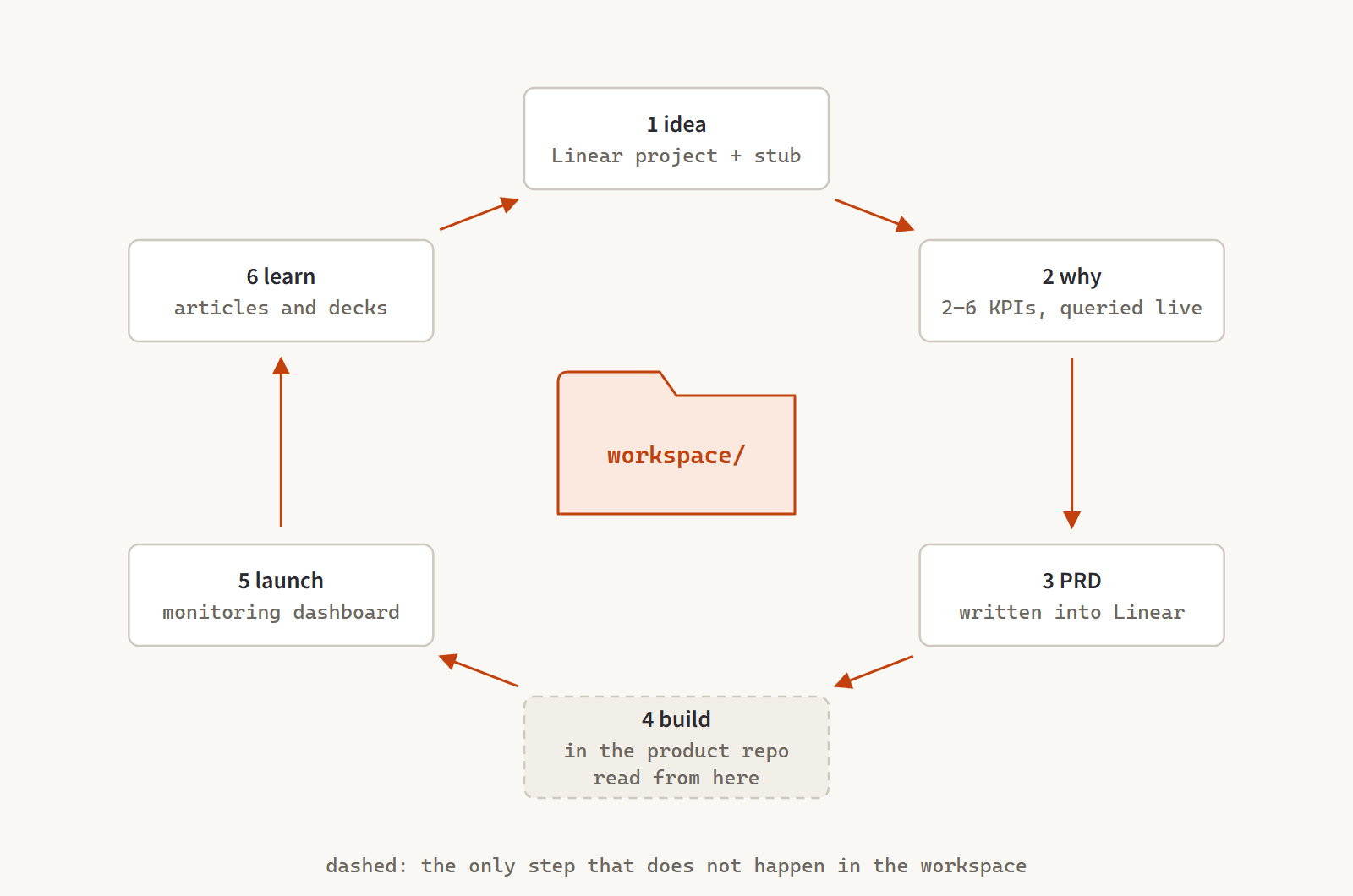 Build is the only step that doesn’t happen in the workspace.
None of the engineering happens here, and that’s on purpose. “Never edit the product code from this workspace” is in the operating manual, right next to “always note date ranges and caveats” and “never save PRDs locally”. The agent reads those rules at the start of every session. It doesn’t forget them on a Friday afternoon. I sometimes do.
Here’s the uncomfortable truth, though: everyone has access to the same models. If your plan is to out-prompt the PM sitting next to you, good luck. The agent isn’t what made my workspace compound. A year of tribal knowledge finally getting written down somewhere the agent could read it did that. The setup is short. The hard part is writing down every convention that lives in your head, every data trap you learned the hard way, and every rule you enforce by remembering to enforce it.
If I Started from Zero
My setup grew around my job, my tools and one company’s data. If I started somewhere new tomorrow, I’d build the same idea in a shape anyone could copy. I’ve been sketching it as a concept I call Product Lab: a git repo full of markdown files that works as a PM’s second brain and command center.
You don’t need a new app. Your editor (VS Code, Zed or Obsidian) plus Claude Code already gives you a workspace, a UI and an AI agent. The repo just adds structure and rules, in three layers:
- The workspace. The repo, your editor and Claude Code. Where you write, read and ask things.
- The orchestrator. A
CLAUDE.mdfile with the house rules and product context, plus skills like/spec-new,/spec-audit,/ost-updateand/weekly-report. All plain text, zero code. - The connectors. Jira, Slack, Google Drive, Notion and so on, plugged in through MCP. They start read-only, and anything that writes needs your approval.
What is MCP?
Model Context Protocol. A standard way for AI agents to plug into tools. Someone builds a Jira connector once, and every agent that speaks MCP can use it. For a PM it mostly means your workflows don’t care whether you’re on Jira or Linear, so switching later is a config change, not a rebuild.
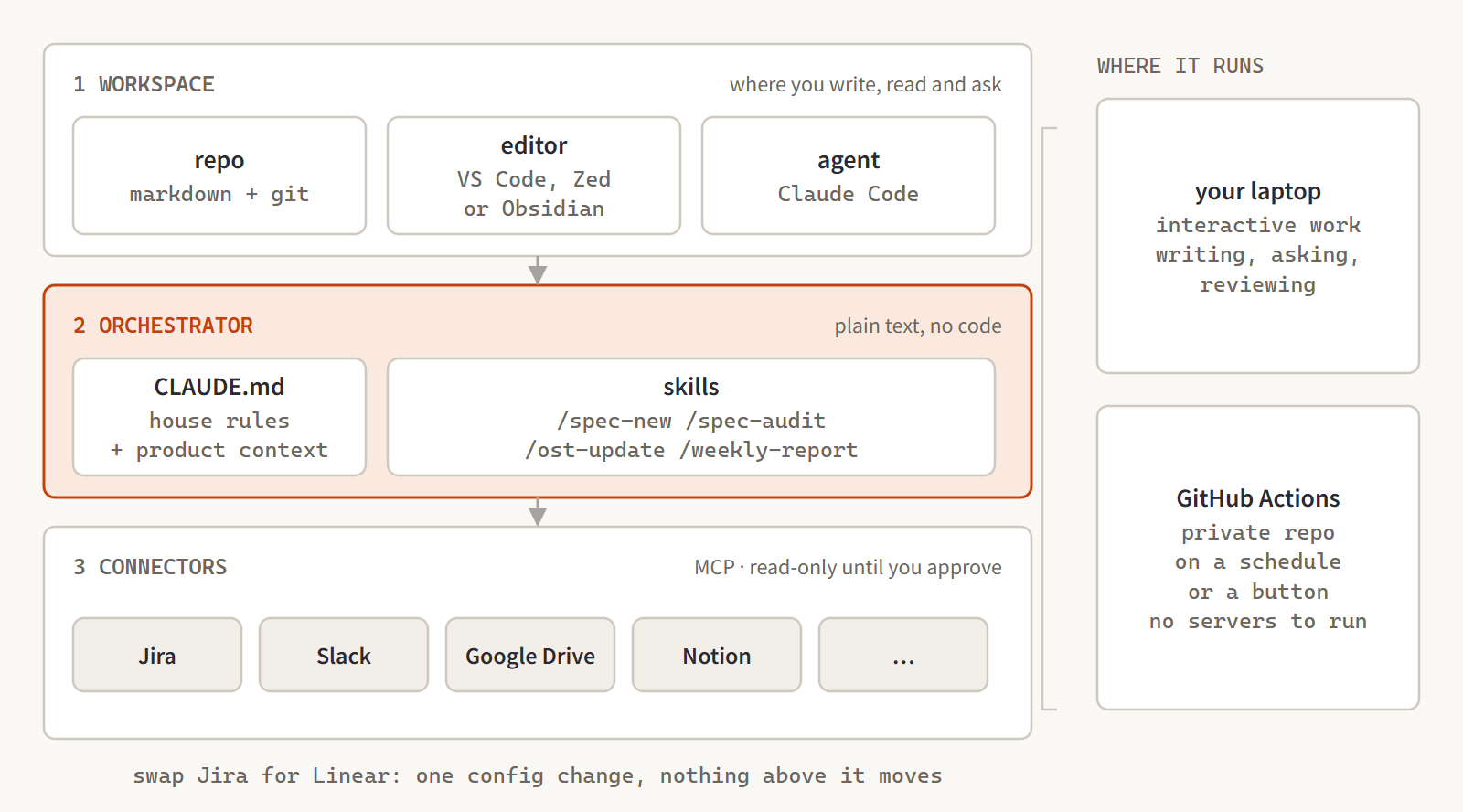 Swap out a connector and nothing above it notices.
Everything lives in plain files (specs, opportunity trees, evidence, reports), so any editor opens them, git tracks every change, and no vendor owns your thinking. Every node in an opportunity tree is its own file linked to its parent, and Claude pulls in evidence from interviews, tickets and Slack and draws the tree for you. Write a PRD and Claude checks its acceptance criteria against the Jira tickets. What’s missing? What crept in? And because a private GitHub repo with Actions can run Claude on a schedule, the weekly report writes itself on Friday morning, gets committed, and lands in Slack before you’re up. No servers to babysit.
Don’t get me wrong, none of this is perfect. It rots if you don’t look after it, and the data traps log only helps if new traps keep landing in it. It’s single-player: the knowledge transfers, but the workspace is shaped around one person’s role, and I haven’t cracked how a whole squad shares it. And the same setup that lets me verify any number in minutes could just as easily produce confident nonsense at scale, if the guardrails and the habit of citing sources weren’t there. The rules file isn’t decoration. It’s what keeps this an operating system instead of a slot machine.
All of that said, for me the trade has been a no-brainer. The eight tabs are all still there.
I just stopped being the integration layer between them.